
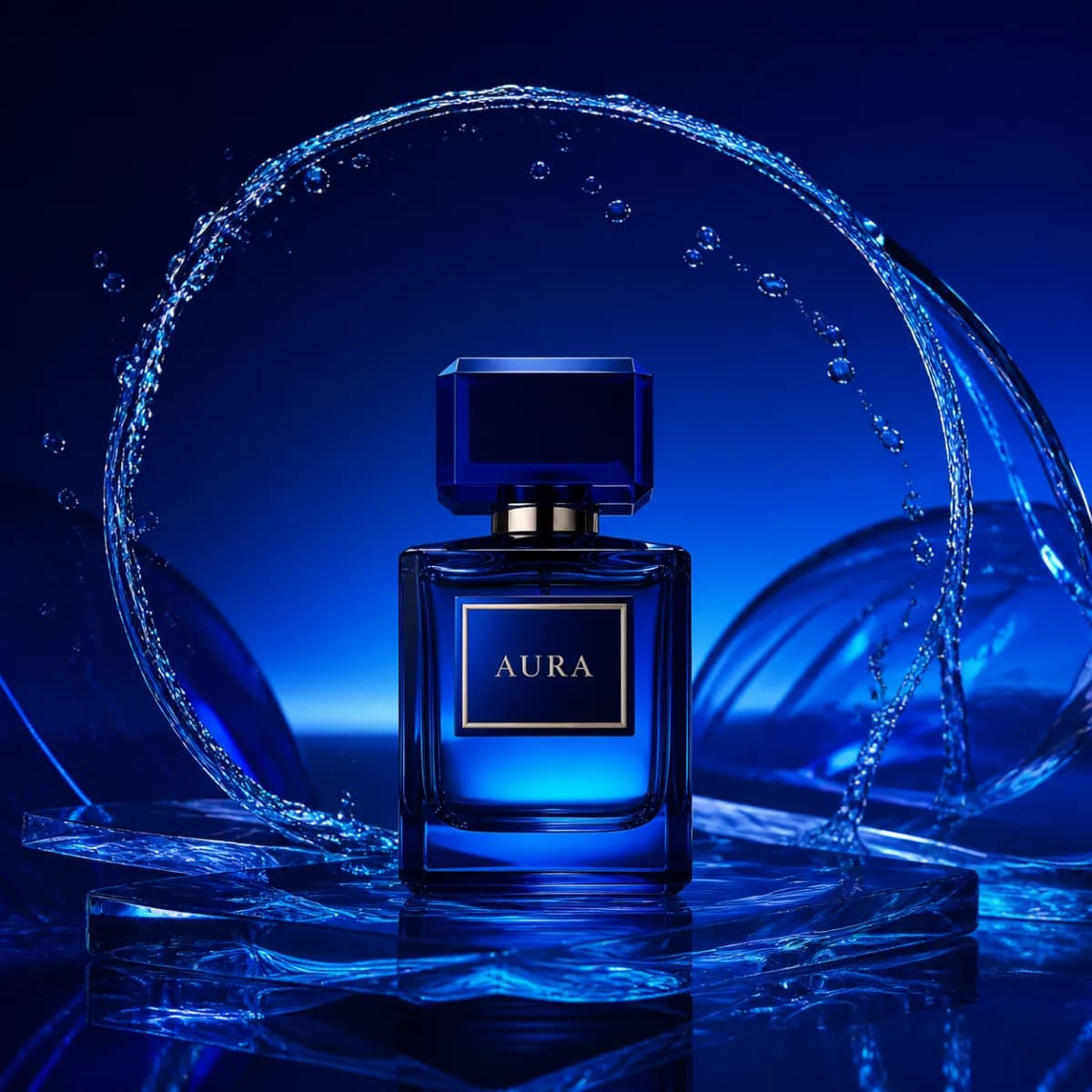
Aura · Product campaign
Product photography · Studio lighting
Luxury campaign photograph of a cobalt blue Aura perfume bottle, water arcing behind it, deep blue studio lighting, crisp glass details, square composition.
Skip costly shoots - learn to generate ai product photo assets in minutes with a practical, studio-quality guide.
Example projects
Product photography · Studio lighting
Luxury campaign photograph of a cobalt blue Aura perfume bottle, water arcing behind it, deep blue studio lighting, crisp glass details, square composition.

Fashion editorial · Natural light
Fashion editorial portrait with sculptural styling, soft window light and a quiet architectural backdrop. Muted tones, natural skin texture, 4:5 composition.

Product campaign · Citrus palette
An editorial citrus drink campaign: fresh lemons, bright yellow details and condensation on glass, hard summer sunlight, clean composition, square format.
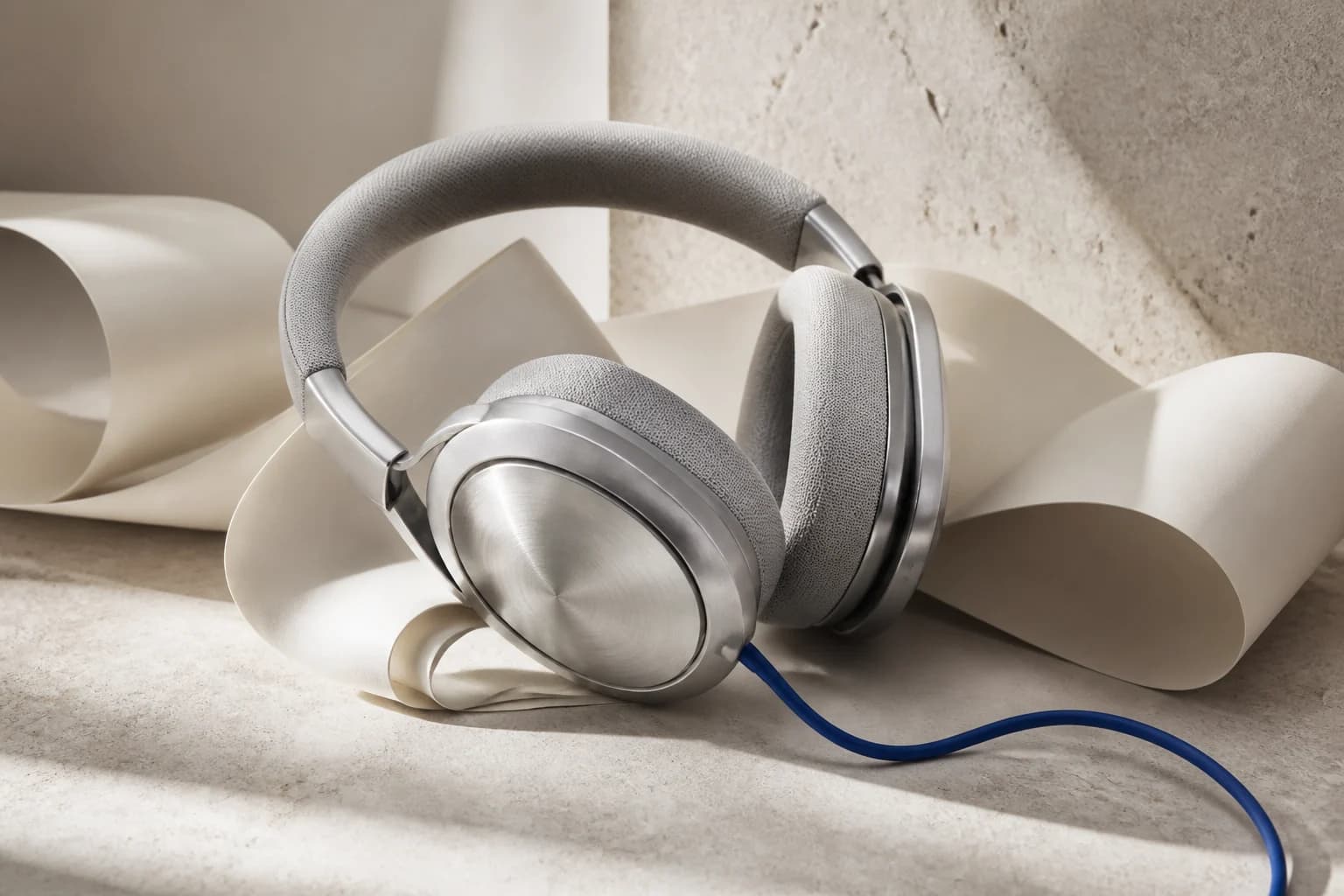
Product photography · Audio equipment
Premium studio headphones on a minimal desk, directional softbox light, detailed brushed metal and soft ear cushions, restrained background, commercial product photography.
Explore freely. Sign up to generate your own. Examples are pre-generated.

So, what exactly is an AI product photo? Think of it as a photorealistic image of your product, created entirely with software. It bypasses the need for cameras, studios, and photographers, letting you generate studio-quality visuals simply by describing the scene you want. This guide provides actionable insights to help you master this technology and build a powerful content engine.
For years, getting great product photos has been a major headache for e-commerce brands. It’s a slow, expensive process filled with logistical hurdles. But that's all changing. Smart businesses are now moving to AI-powered workflows to create incredible images on demand, and they aren't looking back.
This shift is about more than just saving some cash. It's a completely new way of thinking about creative work. Instead of booking photographers, renting studios, and shipping products back and forth, you can now generate an entire campaign’s worth of visuals from a single dashboard. This kind of speed gives direct-to-consumer (DTC) brands a massive advantage, letting them jump on trends and keep their online storefronts looking fresh.
To truly appreciate the shift, it helps to see a direct comparison. The old way of doing things involved a lot of moving parts, time, and money. The new AI-driven approach cuts through all of that complexity. The actionable insight here is clear: AI offers a direct path to reducing overheads and increasing creative output.
Here’s a simple breakdown of how the two methods stack up:
| Metric | AI Product Photography | Traditional Photoshoot |
|---|---|---|
| Cost | Minimal subscription fees. Often 80%+ cheaper. | High costs for photographers, studios, models, and gear. |
| Speed | Images generated in minutes. | Weeks or months of planning, shooting, and editing. |
| Flexibility | Instantly create infinite variations, styles, and backgrounds. | Limited by the physical location, props, and time available. |
| Scalability | Easily produce thousands of images for different markets or SKUs. | Scaling is expensive and time-consuming. |
The takeaway is clear: AI removes the traditional barriers to high-quality visuals, making it possible for brands of any size to compete on a level playing field.
The financial impact of this change is hard to overstate. The AI product photography market is already exploding, set to grow from $450 million in 2024 to an estimated $5 billion by 2035. This isn't just a niche trend; it’s a massive market correction.
We're seeing real-world results, too. Recent data shows that 76% of small and medium-sized businesses that have adopted AI tools have slashed their visual content creation costs by over 80%. You can explore more AI photography stats and see how they’re reshaping e-commerce.
Just think about the expenses you can completely eliminate:
By sidestepping these costs, even a small startup can build a library of diverse, high-end images that once only a large corporation could afford.
What used to take weeks of planning and thousands of dollars can now be done in an afternoon with a few well-written prompts. This is the new reality for e-commerce marketing.
But the real power here isn't just about creating a single image. The best platforms are weaving AI product photo generation into a complete content creation system. It’s no longer just about the picture; it’s about what you do with it next.
With a platform like Verbatik, for example, your workflow doesn't stop once the image is ready. That new visual becomes the starting point for all kinds of marketing assets. You can instantly spin a set of product photos into a sharp-looking video ad or an engaging social media clip.
This is where an integrated toolset really shines. Verbatik also includes unlimited text-to-speech and voice cloning, so you can add a professional, natural-sounding voiceover to those videos without hiring anyone. You can describe a new product, walk a customer through a feature, or even create a user-style testimonial—all inside the same platform. It’s a unified approach that helps you build a true content engine that can scale with your brand.
Great AI product photos don’t just happen by magic. I've seen countless teams waste time and credits generating images that miss the mark, all because they skipped the most important part: the planning. Before you write a single prompt, you have to put on your creative director hat and build a solid game plan. This is the most actionable step you can take: separating a folder of random, unusable pictures from a powerful, on-brand visual library.
First things first, you need to have a gut-level understanding of your brand's visual identity. Are you minimalist and clean, or are you all about vibrant, energetic colors? Do your products feel luxurious and high-end, or are they fun and approachable? Nailing this down gives you a North Star for every creative decision you'll make.
This planning phase completely redefines the old content workflow. We’re moving away from the time and expense of traditional photoshoots and into a much faster, more flexible model driven by AI.

As you can see, the AI generation step essentially replaces the entire physical photoshoot. It allows you to go straight from a concept and a single product image to your final, polished visuals.
Once your aesthetic is clear, it's time to create a detailed shot list. Think of this as your master plan, outlining every single image you need. A good shot list ensures you get a comprehensive set of visuals for everything from your product pages to your social media campaigns.
I always recommend starting with the absolute must-haves for any product:
Don't just write down the shot type; get descriptive. For a skincare brand, a generic "lifestyle shot" on your list should become something like: "A bottle of our vitamin C serum on a minimalist white marble bathroom counter, next to a small green succulent, with soft morning light." That level of detail is gold—it translates directly into a much stronger prompt down the line.
A well-crafted shot list is your blueprint for success. It forces you to think through your entire visual strategy upfront, saving you from endless trial-and-error during the generation phase.
Next up: angles and composition. To create a truly engaging product gallery, you need variety. Don't just settle for the standard, front-on view for every shot. Get creative and explore different perspectives to see what works.
Here are a few camera angles to start thinking about for your shot list:
Let's say you're launching new headphones. Your shot list might specify a sleek, eye-level hero shot for the main PDP image, a high-energy Dutch angle shot for an Instagram ad, and a detailed close-up on the ear cup's texture. Planning these compositions ensures you get the exact AI product photo you need for every marketing channel. To see how these ideas come to life, check out the powerful tools on our photo AI generator page.
This planning doesn't just stop at static images, either. Once you've built a library of stunning visuals, a platform like Verbatik helps you take the next step. Its suite also includes features like unlimited text to speech and voice cloning, which means you can instantly turn those new product photos into compelling video ads with lifelike voiceovers—all in one place.
The prompt is where the real magic happens in AI product photography. This is your chance to step into the director's chair and tell the AI exactly what to create. A vague, one-line prompt will almost always give you a generic, unusable image. But a detailed, layered prompt? That’s your ticket to unlocking studio-quality shots that look just like the real thing.

I've learned to think of a prompt less like a command and more like a recipe. Each component you add brings you one step closer to the final image in your head. The more specific you get, the more control you have. This actionable insight shifts the process from a frustrating guessing game into a reliable creative workflow.
So, what does a powerful prompt actually look like? It's a structured blend of descriptions covering the product, the environment, and the technical "camera" details. Getting these elements right is key.
Here's a breakdown of the components I always try to include in my prompts for generating high-quality product photos.
| Component | Purpose | Example |
|---|---|---|
| Product Details | Go beyond the basics. Describe materials, colors, textures, and key features. | "A minimalist Scandinavian backpack made of dark gray water-resistant canvas with tan leather straps and brass buckles." |
| Scene & Background | Set the stage. Where is the product? What surrounds it? | "On a pure white background for an e-commerce listing." or "On a rustic dark oak table next to a steaming cup of coffee." |
| Lighting Style | Crucial for mood. This dictates the entire feel of the photo. | "Soft, natural morning light," "dramatic side lighting with long shadows," or "clean studio lighting with a large softbox." |
| Camera & Lens | Mimic a real photoshoot by defining the camera setup. | "Shot with a 50mm lens," "f/2.8 aperture for a shallow depth of field," or "close-up macro shot." |
| Mood & Style | Guide the overall aesthetic and emotional tone of the image. | "Minimalist and clean," "cinematic and moody," or "vibrant and energetic." |
Adding this level of detail is more important than ever. The market for AI photo tools is growing incredibly fast, with some analysts predicting it will be a $7.5 billion industry by 2025. This growth is fueled by AI's newfound ability to render stunningly realistic lighting and materials. To take full advantage, your prompts need to be just as sophisticated.
Let's move from theory to practice. Imagine you're selling a luxury watch. A lazy prompt like "photo of a watch" will give you something forgettable. Instead, let’s build a layered, actionable prompt.
Example 1: The Luxury Watch
Prompt: A hyperrealistic product photo of a luxury chronograph watch with a stainless steel bracelet and a deep blue face. The watch is lying on a polished dark oak surface. The scene is illuminated by dramatic side lighting, creating long, soft shadows and highlighting the metallic texture. Shot with a macro lens, f/4 aperture, creating a slightly blurred background. Cinematic and elegant mood.
See the difference? That detail gives the AI everything it needs to create a specific, high-end visual. Now, let’s try a totally different product—a running shoe.
Example 2: The Running Shoe
Prompt: Action shot of a vibrant neon green and black running shoe, captured mid-stride with a subtle motion blur effect. The shoe is on a wet asphalt road, with water splashing around it. Bright, clean commercial lighting. Shot at a low angle to feel dynamic. High-energy and powerful aesthetic.
Notice how the prompt guides every single aspect, from the product's look to the exact feeling the image should evoke. If you want to dive deeper into creating different kinds of visuals, you might find our guide on leveraging a variety of AI generators helpful.
Creating one perfect ai product photo is a great start, but building a cohesive product gallery requires consistency. This is where seed numbers become your best friend. A seed number is simply a unique ID assigned to each image you generate.
Here's an actionable insight: When you find a style you love—the lighting, composition, and overall mood—reusing its seed number while making small tweaks to your prompt tells the AI to create a new image in that exact same style.
For instance, you could take the seed from your hero watch shot and change the prompt to "side view of the watch crown" to get a detail shot that perfectly matches your main image. This technique is a game-changer for producing an entire series of on-brand visuals without starting from scratch every single time.

So, you've generated a gorgeous AI product photo. That’s a huge win, but it’s just the starting line. Before that image can make you money on Amazon, Shopify, or Etsy, it needs to be polished and checked against their very specific rules.
This is the part where you turn a great-looking image into a high-converting asset that won’t get flagged or rejected. The real trick is to handle most of the technical requirements directly in your prompts, which saves a ton of time editing later. Even so, a quick final review is always a good idea.
Every e-commerce platform has its own playbook for product imagery. If you don't follow the rules, your listings can get buried or even taken down. Amazon is notoriously strict, especially when it comes to the main "hero" image.
Here's an actionable checklist to meet the most common marketplace standards:
on a pure white background, #FFFFFF to your prompt.By building these details into your prompts, you get images that are already 90% of the way there, saving you from a headache in Photoshop.
The most efficient workflow is to let the AI handle compliance. Bake the rules directly into your prompts, and you'll generate images that are practically ready to upload.
Even the most perfect prompts can sometimes produce an image that needs a little nudge. Maybe the color is a hair off, or a different crop would make the composition stronger. These are quick fixes you can handle in almost any photo editor.
When you're doing a final review, focus on these small but impactful tweaks:
These final touches are what separate a good AI product photo from a great one. They also play a critical role in building a strong visual brand. If you need some ideas on how to use these polished images across your channels, check out our guide on creating engaging social media content.
Don’t forget that Verbatik offers more than just static images. With integrated features like unlimited text to speech and voice cloning, you can turn these perfected visuals into compelling video ads. Imagine creating a stunning photo and then, in the same workflow, using it as the backdrop for a promotion with a natural-sounding voiceover. That’s how you build a modern content engine.
Getting a few perfect AI product photos is a solid win. But if you really want to pull ahead of the competition, you need to think bigger. It's time to shift your mindset from creating one-off images to building a full-blown content factory that consistently produces marketing assets.
The goal is to create a smooth, repeatable process for generating hundreds of visuals in batches. The real magic, though, happens when you see those images not as the final product, but as the starting point for a much larger campaign. This is how you turn static photos into a multi-format strategy that connects with customers on every platform.
Trying to scale your content by jumping between different tools for images, videos, and audio is a recipe for frustration. A unified platform is what makes this possible, letting you manage everything from a single dashboard. With Verbatik, that new AI product photo is the foundation for your next video ad, a quick social media clip, or an eye-catching website banner.
This integrated approach is exactly how modern D2C brands build momentum. They can spin up a whole suite of assets—product shots, short-form video ads, and professional voiceovers—all from one place, leveraging features like Verbatik's unlimited text-to-speech and voice cloning. This is the secret weapon for agile marketing teams and agencies looking to own their niche.
One of the most effective ways to get more mileage out of your visuals is by adding audio. Imagine taking a beautiful lifestyle shot of your product and, in a matter of minutes, turning it into a video ad with a crisp, clear narration explaining why customers need it.
This is where Verbatik’s unique setup really shines. The platform gives you unlimited text-to-speech and voice cloning, so you can generate incredibly realistic narration for any video you create. Here are some actionable ideas:
The ability to clone your own voice—or the voice of a brand ambassador—with Verbatik's unlimited text-to-speech and voice cloning adds a layer of authenticity that makes your content feel more personal and trustworthy.
An integrated content engine amplifies every single visual asset you create. A single AI product photo can become the seed for a dozen different pieces of content, from a simple social post to a fully narrated video ad.
Building a true content engine isn’t about random acts of creation. It's about establishing a clear, structured process that your whole team can use to produce consistent, on-brand material at scale.
Here’s an actionable workflow using a unified platform like Verbatik.
First, generate your core visuals. This is where you batch-generate all the hero shots, lifestyle images, and feature callouts from your shot list. Use your saved seed numbers to keep the style consistent across the entire photo set.
Next, create video variations. Pick your strongest images and head over to the video creation tools. This is your chance to turn them into short-form ads perfect for TikTok, Instagram Reels, and YouTube Shorts.
Then, add voice and sound. Write a quick script for each video and use the unlimited text-to-speech feature to generate a high-quality voiceover. You can even use Verbatik's unlimited voice cloning to create a custom brand voice or add custom-generated sound effects from its library of royalty-free music to make your video pop.
Finally, organize and deploy. Save all your finished assets—images, videos, and audio files—into project folders right on your dashboard. This builds a central library that makes it incredibly easy to find and push content out to all your marketing channels.
This kind of systematic approach ensures you're not just making more content, but smarter content that works together to build your brand and drive sales. It's a sustainable model built for modern marketing.
As you start exploring AI for your product shots, you're bound to have some questions. It’s a completely new way to create visuals, and a few common hurdles pop up for almost everyone. Let's walk through some of the most frequent questions I hear about generating an ai product photo.
We've gathered the most common queries and provided clear, practical answers below to help you navigate the process.
| Frequently Asked Questions About AI Product Photography |
|---|
| FAQ 1: Can AI generate a photo of my exact product? Answer: Yes, with the right technique. Instead of just naming your product, you need to describe it with extreme detail. For example, 'A sleek matte black over-ear headphone with silver metallic accents, cushioned leather earcups, and a minimalist logo on the side.' This detailed description becomes the core of your prompt. This actionable method is more powerful than basic image-to-image for creating unique, commercial-grade imagery from scratch. |
| FAQ 2: Are AI-generated photos allowed on Amazon and Shopify? Answer: Absolutely, as long as you follow their specific guidelines. For main images, Amazon requires a pure white background (RGB 255, 255, 255), which you can easily specify in your prompt (e.g., 'on a pure white background, #FFFFFF'). AI excels at generating images that meet exact resolution and format requirements. For secondary lifestyle images, where creative backgrounds are encouraged, AI gives you a massive advantage. Always check the latest seller guidelines for any platform you use. |
| FAQ 3: How do I keep my brand's style consistent with AI? Answer: Consistency comes from three key tactics. First, create a prompt style guide that outlines your core visual DNA (e.g., 'warm natural lighting,' 'minimalist aesthetic'). Second, master the 'seed' number. When you generate an image style you love, reusing its seed number with minor prompt tweaks helps maintain a similar look and feel. Finally, use a platform like Verbatik, with its unlimited text to speech and voice cloning, to save your best prompts and assets as templates, ensuring a consistent look and sound for your brand. |
These are just a few of the questions that come up, but they cover the big hurdles most people face when starting out.
So, can you really get a photo of your specific product? Yes, but you have to think like an artist painting a picture, not a search engine. Simply typing "MyBrand headphones" won't cut it.
The secret is in the description. You need to feed the AI incredibly specific details. Think about a prompt like this: "A sleek matte black over-ear headphone with silver metallic accents, cushioned leather earcups, and a minimalist logo on the side." That detailed text becomes the blueprint. This actionable approach gives you far more creative control and unique results than just using basic image-to-image features.
This is a big one, but the answer is simple: yes, AI-generated photos are perfectly fine, as long as you play by the rules. The marketplaces themselves don't care how you made the image; they only care that it meets their technical standards.
For instance, Amazon's famous requirement for a pure white background (RGB 255, 255, 255) on main "hero" images is easy to handle. You just add "on a pure white background, #FFFFFF" to your prompt. AI is brilliant for this because you can dial in exact resolutions and aspect ratios right from the start. And for all your secondary lifestyle shots? That's where AI really opens up a world of creative possibilities. If you want to dive deeper, this AI Product Photography Guide is an excellent, in-depth resource.
The key takeaway is that marketplaces care about compliance, not the tool you used to create the image. If your AI-generated photo meets the background, resolution, and framing rules, it's good to go.
Keeping a cohesive look across your product catalog is essential for brand recognition, and AI actually offers some powerful tools to enforce that consistency. It really boils down to three core tactics.
Build a Prompt Style Guide: This is your brand's visual bible. Document the keywords that define your aesthetic—things like lighting ('warm natural light'), mood ('minimalist and clean'), and composition ('eye-level shot'). Anyone on your team can then pull from this guide.
Get to Know the "Seed" Number: When you generate an ai product photo that just nails your brand's style, grab its unique seed number. Reusing that seed while making small changes to the prompt tells the AI to create a new image with a very similar vibe and composition. It’s a game-changer for consistency.
Use a Central Platform: A tool like Verbatik is perfect for this. It lets you save your best-performing prompts and generated images as templates, so anyone can create on-brand visuals quickly. This consistency goes beyond just images; you can then repurpose those visuals into videos with Verbatik's unlimited text to speech and voice cloning, making sure your brand's voice is just as consistent as its look.
Ready to stop just making images and start building a dynamic content engine? With Verbatik, you can generate incredible product photos and instantly spin them into engaging video ads, complete with lifelike voiceovers, thanks to its unlimited text to speech and voice cloning features. Check out the all-in-one content platform at https://verbatik.com.
Join 150,000+ creators, developers, and businesses using Verbatik AI to produce studio-quality voiceovers, clone voices, and generate music and sound effects.
150K+
creators
150+
languages
75ms
latency
Trusted by teams at leading companies worldwide


